
We may earn a commission when you buy through links on this page, at no extra cost to you. Learn more
A mechanical keyboard changes the way typing feels — every keypress is crisp, deliberate and satisfying in a way membrane keyboards never match. After comparing the most popular boards on Amazon, our top pick is the Keychron K8 Pro Wireless Mechanical Keyboard, a hot-swappable 87-key board with full QMK/VIA remapping, a solid aluminum frame and Bluetooth for three devices.
In this guide, we compare five of the best mechanical keyboards for typing and gaming in 2026, from a whisper-quiet Logitech built for the office to a budget 60% board that punches far above its price. Whether you type all day or play competitively at night, you will find a board here that fits your desk and your hands.
As an Amazon Associate, Helmet Today earns from qualifying purchases — at no extra cost to you. Prices change often, so use the Check Price buttons to see today’s deal.
| Product | Key Features | Best For | Price |
|---|---|---|---|
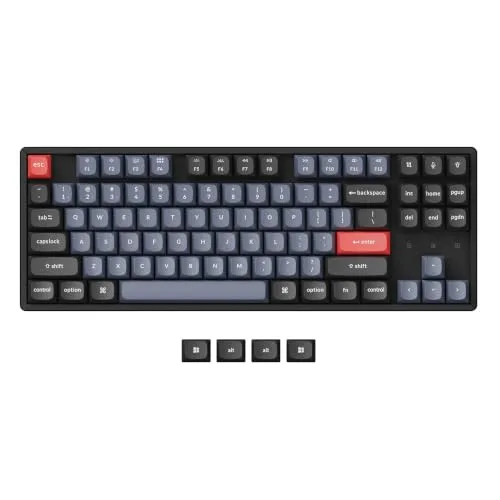 Keychron K8 Pro Wireless Mechanical Keyboard |
Full QMK/VIA remapping and macros Hot-swappable 87-key TKL; aluminum frame Bluetooth 5.1 for 3 devices + USB-C; 4,000 mAh |
Best Overall | Check Price on Amazon |
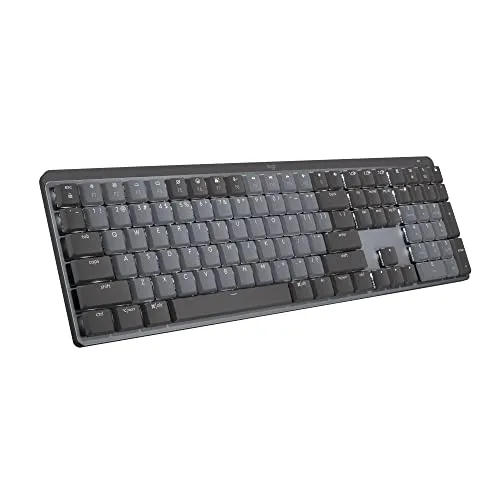 Logitech MX Mechanical, Tactile Quiet |
Low-profile Tactile Quiet switches Smart backlight lights as hands approach Pairs with 3 devices; up to 10 months battery |
Best for Office | Check Price on Amazon |
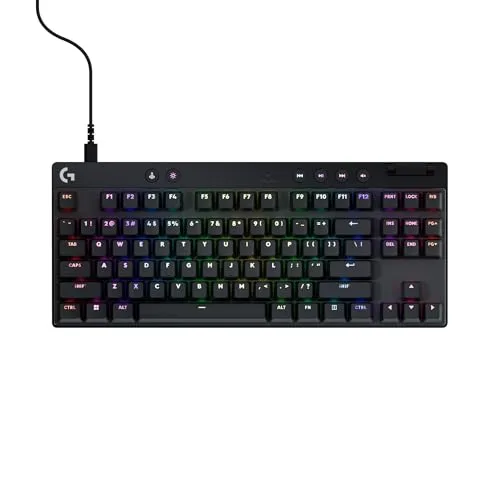 Logitech G Pro X TKL Rapid, Black |
Magnetic analog Hall-effect switches Adjustable actuation; Rapid Trigger for FPS KEYCONTROL per-key commands; LIGHTSYNC RGB |
Best for Gaming | Check Price on Amazon |
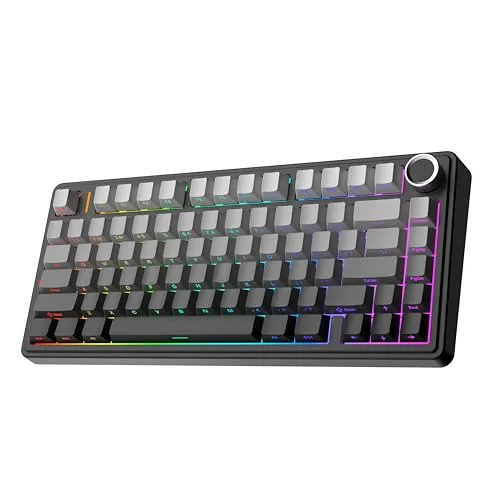 EPOMAKER x Aula F75, Black Gradient |
75% gasket layout, five-layer sound padding Pre-lubed LEOBOG Reaper switches, full hot-swap Tri-mode Bluetooth/2.4 GHz/USB-C; control knob |
Best Value | Check Price on Amazon |
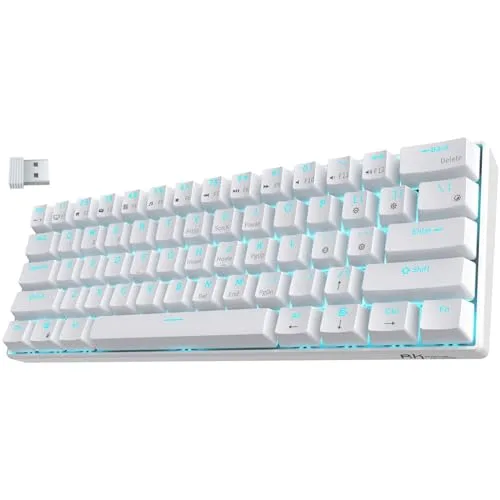 RK Royal Kludge RK61, White |
Triple mode Bluetooth 5.0 / 2.4 GHz / USB-C Compact 61-key 60% layout Hot-swap PCB (3-pin and 5-pin); 17 backlight modes |
Best Budget | Check Price on Amazon |
Keychron K8 Pro Wireless Mechanical Keyboard — Best Overall
The Keychron K8 Pro is the mechanical keyboard we recommend to most people. It is a hot-swappable 87-key tenkeyless board with full QMK/VIA support, so you can remap any key and build macros on macOS, Windows or Linux — no proprietary software needed.
The OSA double-shot PBT keycaps and aluminum frame feel premium, Bluetooth 5.1 connects to three devices, and south-facing RGB keeps the legends readable. Screw-in stabilizers and foam plus silicone dampening keep typing quiet and solid, and the 4,000 mAh battery lasts around 72 hours. It is a board that grows with you.
Key Features
- Full QMK/VIA remapping and macros on macOS/Windows/Linux
- Hot-swappable 87-key TKL with OSA double-shot PBT and aluminum frame
- Bluetooth 5.1 for 3 devices + USB-C; south-facing RGB; 4,000 mAh battery (~72 hours)
Pros
- Full customization with open QMK/VIA firmware
- Premium aluminum build with quiet, dampened typing
- Hot-swappable switches for easy changes later
Cons
- No 2.4 GHz dongle (Bluetooth/wired only)
- Aluminum frame is heavy for travel
Logitech MX Mechanical, Tactile Quiet — Best for Office
The Logitech MX Mechanical is the mechanical keyboard for people who work in shared spaces. Its low-profile Tactile Quiet switches give you a satisfying bump with very little noise, so you get the mechanical feel without disturbing anyone around you.
A smart backlight lights up as your hands approach and adjusts to the room, and the board pairs with three devices over Bluetooth or Logi Bolt. Logi Options+ and Flow let you move between computers with one keyboard. Over USB-C it runs 15 days with the backlight on — and up to 10 months with it off.
Key Features
- Low-profile Tactile Quiet switches — satisfying bump, little noise
- Smart backlight lights as hands approach and auto-adjusts
- Pairs with 3 devices via Bluetooth or Logi Bolt; Logi Options+ and Flow
Pros
- Quiet typing that suits offices and shared spaces
- Smart backlight and multi-device pairing
- Exceptional battery life — up to 10 months without backlight
Cons
- Premium price
- Low-profile feel is not for everyone
Logitech G Pro X TKL Rapid, Black — Best for Gaming
The Logitech G Pro X TKL Rapid is built for competitive play. Its magnetic analog Hall-effect switches let you adjust the actuation point, and Rapid Trigger resets keys the instant you lift your finger — a real edge in fast FPS games where every millisecond counts.
KEYCONTROL gives you per-key commands in G HUB, LIGHTSYNC RGB lights the board, and double-shot PBT keycaps stand up to hard use. The detachable USB-C cable keeps your desk tidy. It is wired only and unapologetically gaming-focused — and for serious players, that is exactly the point.
Key Features
- Magnetic analog Hall-effect switches with adjustable actuation, 35 g force
- Rapid Trigger for FPS play; KEYCONTROL per-key commands in G HUB
- LIGHTSYNC RGB; double-shot PBT; detachable USB-C
Pros
- Adjustable actuation and Rapid Trigger for competitive play
- Durable double-shot PBT keycaps
- Deep per-key customization in G HUB
Cons
- Wired only
- Gaming-focused design
EPOMAKER x Aula F75, Black Gradient — Best Value
The EPOMAKER x Aula F75 is the board keyboard enthusiasts keep recommending, because it sounds and feels like boards costing twice as much. Its 75% gasket layout and five-layer sound padding produce a deep, creamy typing sound straight out of the box.
Pre-lubed LEOBOG Reaper switches are fully hot-swappable on a flex-cut plate, and tri-mode Bluetooth, 2.4 GHz and USB-C cover every setup. A 4,000 mAh battery, a control knob and Cherry-profile PBT keycaps round out a package that is hard to beat for the money.
Key Features
- 75% gasket layout with five-layer sound padding
- Pre-lubed LEOBOG Reaper switches, full hot-swap, flex-cut plate
- Tri-mode Bluetooth/2.4 GHz/USB-C; 4,000 mAh; control knob; Cherry-profile PBT
Pros
- Superb sound and feel for the price
- Tri-mode connectivity and a control knob
- Fully hot-swappable switches
Cons
- Companion software less polished than Logitech’s
- Knob functions are basic
RK Royal Kludge RK61, White — Best Budget
The RK Royal Kludge RK61 is the best way to try a mechanical keyboard without spending much. Its compact 61-key 60% layout frees up desk space, and triple-mode Bluetooth 5.0, 2.4 GHz and USB-C mean it works with anything.
The hot-swap PCB accepts 3-pin and 5-pin switches, so you can change the feel later without soldering, and 17 backlight modes add some fun. Battery life is around 13 hours per charge with 360 hours of standby — the one place where its size shows.
Key Features
- Triple mode Bluetooth 5.0 / 2.4 GHz / USB-C
- Compact 61-key 60% layout; hot-swap PCB (3-pin and 5-pin)
- ~13 hours per charge (360 hours standby); 17 backlight modes
Pros
- Great value entry into mechanical keyboards
- Triple-mode connectivity and hot-swap switches
- Compact layout frees up desk space
Cons
- 60% layout means arrow keys sit on a function layer
- Smaller battery than full-size boards
Buying Guide: What to Look For
Switch Type
Switches decide how a keyboard feels and sounds. Linear switches press smoothly, tactile switches give a small bump, and clicky switches add a loud click. Quiet tactile switches, like the ones on the Logitech MX Mechanical, suit offices, while Hall-effect switches like the ones on the G Pro X TKL Rapid are made for gaming.
Layout and Size
Full-size boards have a number pad, tenkeyless (TKL) boards drop it, 75% boards compress the layout further, and 60% boards like the RK61 drop the arrow keys to a function layer. If you work with numbers, keep the pad; if you want desk space for your mouse, go smaller.
Hot-Swap and Customization
Hot-swappable boards let you pull out switches and push in new ones without soldering, so you can change the feel later. QMK/VIA support, like on the Keychron K8 Pro, lets you remap keys and build macros without proprietary software. Both features make a board last longer.
Connectivity
Bluetooth connects to several devices and works with phones and tablets, 2.4 GHz gives the lowest latency for gaming, and wired USB-C never needs charging. Tri-mode boards like the EPOMAKER F75 and RK61 cover all three, while the Keychron K8 Pro sticks to Bluetooth and wired.
Sound and Build
Gasket mounts, foam and silicone dampening all shape how a keyboard sounds — the EPOMAKER F75 uses five layers of padding for its deep, creamy sound. Aluminum frames feel solid and stay put, while plastic frames are lighter and cheaper. Listen for sound tests if you can before you buy.
Frequently Asked Questions
Are mechanical keyboards better for typing?
For most people, yes. Each key has its own switch, so keypresses feel more precise and consistent than a membrane keyboard, and you can choose switches that match your fingers. The difference is most obvious if you type all day — many typists find mechanical boards faster and more comfortable over long sessions.
What does hot-swappable mean?
Hot-swappable means you can pull switches out of the board and push new ones in without soldering. It lets you change the feel of your keyboard later, replace a worn switch, or try different switch types. The Keychron K8 Pro, EPOMAKER F75 and RK61 in this roundup are all hot-swappable.
Do I need a 2.4 GHz dongle or is Bluetooth enough?
Bluetooth is fine for typing and everyday use, and it pairs with several devices. For competitive gaming, 2.4 GHz has lower latency and is the better choice — the EPOMAKER F75 and RK61 both offer it. The Keychron K8 Pro skips 2.4 GHz entirely, so if you want it, pick a tri-mode board instead.
Our top pick is the Keychron K8 Pro Wireless Mechanical Keyboard because it combines full QMK/VIA customization, a premium aluminum build and hot-swappable switches in a board that works with any computer. If gaming is your priority, the runner-up Logitech G Pro X TKL Rapid, Black brings adjustable Hall-effect switches and Rapid Trigger to competitive play. Whichever you choose, check today’s price with the buttons above — deals on these keyboards change often.

Olivia
Writer at Helmet Today, covering helmet reviews, fit and riding safety.