

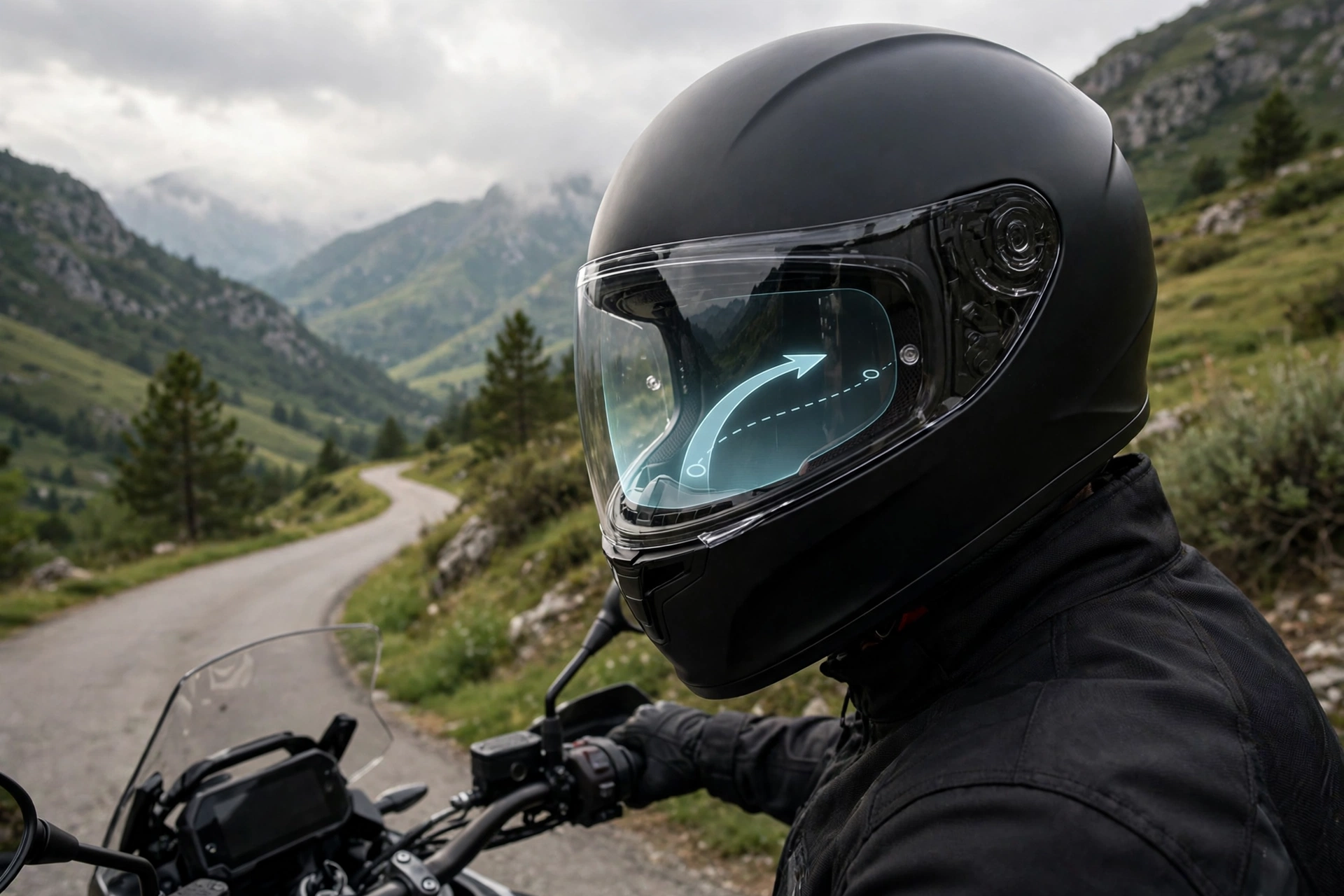
A helmet with a heads-up display, or HUD, projects information such as speed, navigation directions, and notifications onto a small transparent screen in front of one eye, so the rider can see it without looking down. The display sits inside or just below the visor area, and the information appears to float a short distance ahead, letting the rider keep their eyes on the road while glancing at data. It is the same idea as a fighter pilot’s HUD or a car’s windscreen display, adapted for a helmet.
This guide explains how helmet HUDs work, what they show, where they help, and what their limits are.
How Does a Helmet Heads-Up Display Work?
A helmet HUD uses a tiny projector or micro-display mounted inside the helmet, which shines an image onto a small transparent combiner — a piece of clear optics positioned in the rider’s line of sight. Because the combiner is transparent, the rider sees the road through it and the projected information overlaid on top.
The optics are designed so the image appears to float a short distance in front of the rider rather than sitting right against the eye. That matters, because the eye can focus on the display and the road more easily when they are at similar distances. The display is deliberately small and positioned toward the edge of vision, so it informs without blocking the view ahead.
Power and data come from the helmet’s electronics and the rider’s phone. The helmet carries a battery and a Bluetooth connection, while the phone supplies navigation, speed data, and notifications. The HUD itself is just the output — the brains are the phone and the helmet’s sensors working together.
What Information Does a Helmet HUD Show?
Navigation is the most useful display. Turn arrows, distance to the next turn, and street names appear in the rider’s view, so there is no need to glance at a handlebar mount or a phone. For a rider in an unfamiliar city, that eyes-up navigation is a real convenience and a safety benefit.
Speed and ride data come next. Current speed, distance travelled, and ride time are common displays, and some systems add gear or battery information for electric bikes. Riders who train with data can watch their numbers without breaking position or concentration.
Notifications and communication round out the picture. Incoming calls, messages, and intercom activity can appear as simple alerts, letting the rider decide whether to respond. Most systems keep these alerts minimal by design — a full message inbox in your field of vision would be a distraction, not a help.
Is a Heads-Up Display Safer Than Looking at a Phone?
In general terms, yes — a HUD is safer than looking down at a phone or a handlebar screen, because the rider’s eyes stay pointed at the road and the head stays level. Even a one-second glance down at speed covers a surprising distance, and a HUD removes that blind moment for routine checks like navigation.
But a HUD is not distraction-free. Reading a display still takes mental attention, even if the eyes stay forward. A complex or cluttered display can pull focus from the road just as surely as a phone, and the safety benefit depends on the display being simple and glanceable.
The best HUD designs therefore show very little: one turn arrow, one speed number, one alert at a time. If a system tempts you to read messages or browse menus while riding, it is adding distraction rather than removing it, and that feature is better left switched off.
What Are the Downsides of Helmet HUDs?
Cost is the first downside. HUD helmets are among the most expensive helmets on the market, and the price reflects the optics, electronics, and software development behind them. For most riders, a conventional helmet plus a phone mount delivers most of the practical benefit for much less money.
Weight and bulk follow. The projector, optics, and battery add weight to the helmet, and the display housing takes up space near the visor. Some riders notice the extra weight on long rides, and the optics can interfere with glasses or goggles if the fit is not right.
Battery life and complexity are further trade-offs. A HUD helmet needs charging, its software needs updating, and its features depend on a phone connection. A rider who wants simple, grab-and-go protection may find the whole system more trouble than it is worth.
Who Should Consider a Helmet With a HUD?
HUD helmets suit riders who navigate unfamiliar routes often — couriers, tourers, and commuters in new cities — and who value eyes-up directions enough to pay for them. They also suit tech-minded riders who already use ride data and want it visible without breaking position.
They suit other riders less well. A rider on familiar local routes gains little from a navigation display, and a rider who dislikes charging gadgets will resent another battery to manage. For short leisure rides, the benefits are thin.
Whatever helmet you choose, the display is only an addition to the helmet’s core job: protecting your head. Modern liners that reduce twisting forces in angled crashes are a more important safety feature than any display, and this guide to MIPS technology explains how they work and why they matter.
Looking ahead, HUD technology is likely to get lighter, cheaper, and less obtrusive, following the same path as other wearable displays. Smaller optics and more efficient batteries should reduce the weight penalty, and better software should make displays simpler and more glanceable. For now, though, HUD helmets remain a premium choice for riders with a specific need. If you are curious but not ready to commit, trying one at a demo day or borrowing a friend’s for a short ride is a good way to learn whether the display genuinely helps you or simply adds another thing to look at.
Frequently Asked Questions
Q: Does a helmet HUD block your view of the road?
A: No, when designed well. The display is small, transparent, and positioned at the edge of vision, so you see the road through it and the information overlaid on top.
Q: Do HUD helmets work without a phone?
A: Only partly. The helmet can show basic data from its own sensors, but navigation and notifications need a phone connection to supply the information.
Q: Are helmet HUDs worth the high price?
A: In general terms, they are worth it mainly for riders who navigate unfamiliar routes often and value eyes-up directions. For familiar local rides, a conventional helmet and phone mount are usually enough.

Olivia
Writer at Helmet Today, covering helmet reviews, fit and riding safety.