
We may earn a commission when you buy through links on this page, at no extra cost to you. Learn more
The best tablets for kids in 2026 give children a safe place to read, play and learn. A good kids tablet pairs a tough case and strong parental controls with content that is actually worth their screen time.
We compared tablets for toddlers, young children and older kids, weighing screen size, battery life, parental controls, content and durability. Our top pick is the Amazon Fire HD 10 Kids, a 10.1-inch tablet with a bright screen, a year of Kids+ content and a free-replacement guarantee. The four tablets below it cover budget, premium, toddler and Google Play needs.
As an Amazon Associate, Helmet Today earns from qualifying purchases — at no extra cost to you. Prices change often, so use the Check Price buttons to see today’s deal.
| Product | Key Features | Best For | Price |
|---|---|---|---|
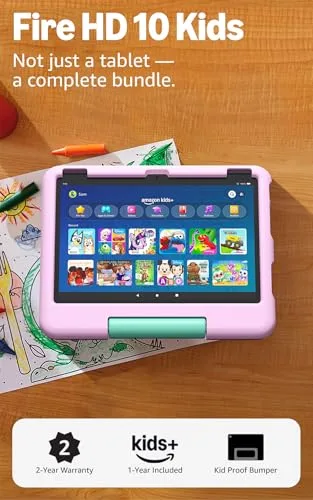 Amazon Fire HD 10 Kids |
10.1-inch HD screen; 1 year of Kids+; 13-hour battery | Best Overall | Check Price on Amazon |
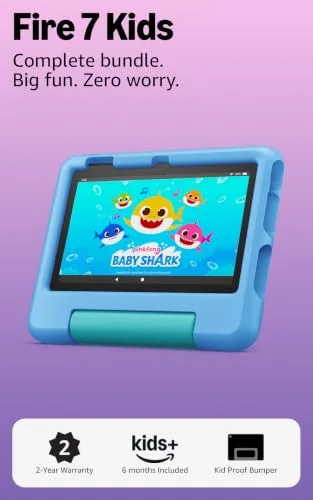 Amazon Fire 7 Kids |
7-inch tablet; 1 year of Kids+; up to 10-hour battery | Best Budget | Check Price on Amazon |
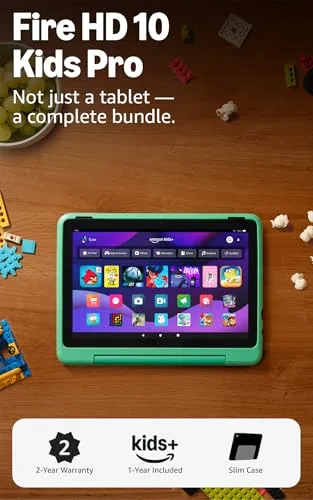 Amazon Fire HD 10 Kids Pro |
10.1-inch HD for ages 6-12; filtered browser; 13-hour battery | Best Premium | Check Price on Amazon |
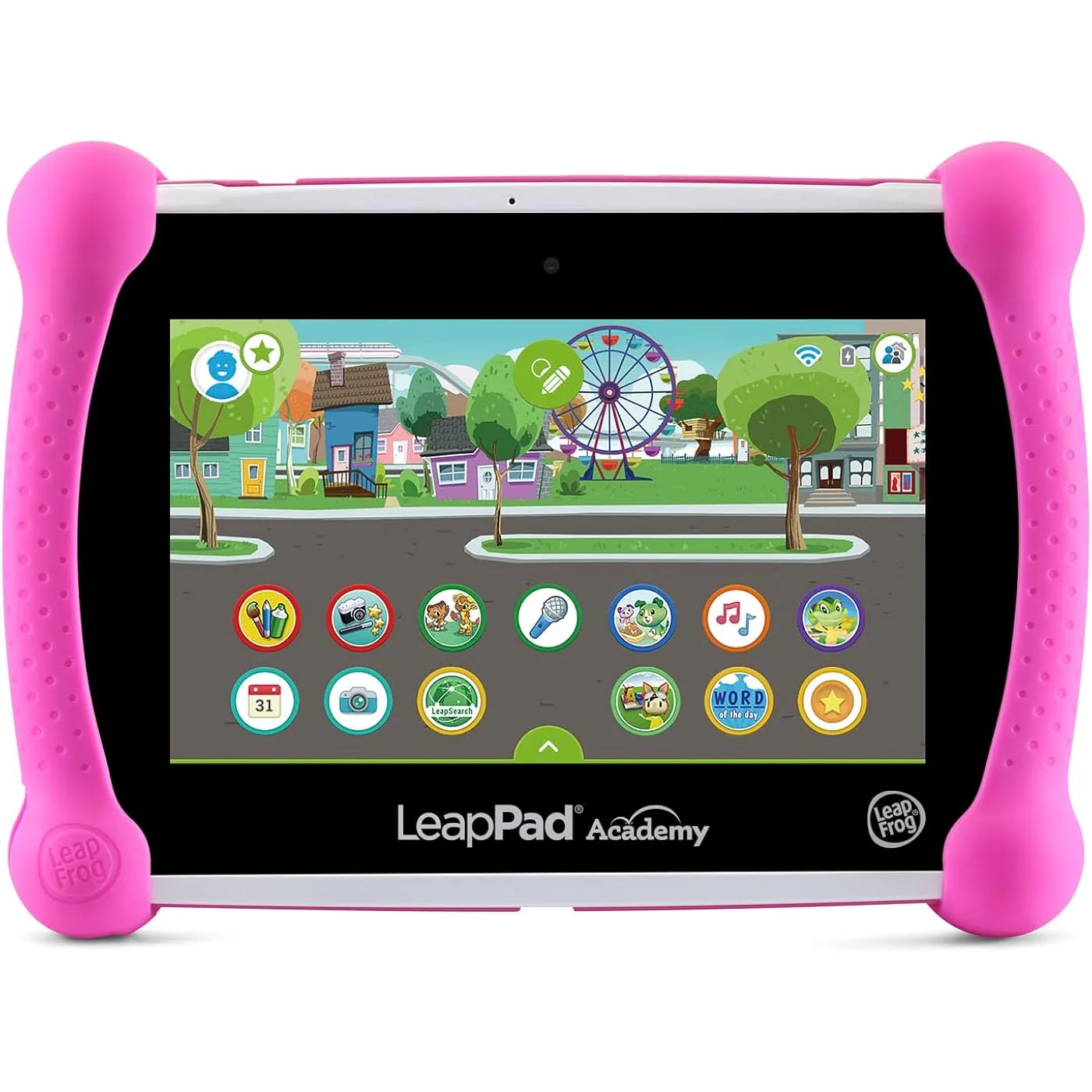 LeapFrog LeapPad Academy |
20+ learning apps; no open web; shatter-safe screen | Best for Toddlers | Check Price on Amazon |
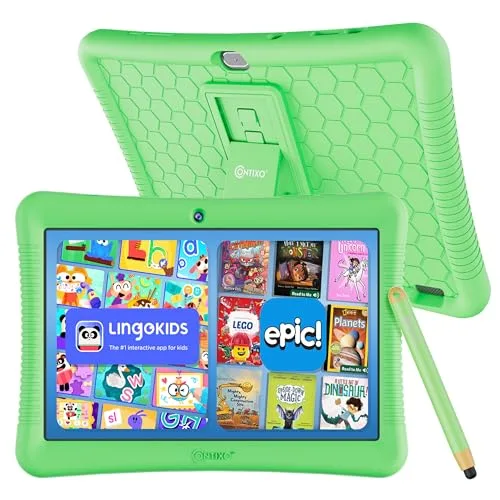 Contixo 10 Inch Kids Tablet |
Full Android with Google Play; 10-inch HD; case and stylus | Best for Google Play Apps | Check Price on Amazon |
1. Amazon Fire HD 10 Kids — Best Overall
The Amazon Fire HD 10 Kids is our top pick because it balances screen, content and peace of mind better than any other kids tablet here. Its 10.1-inch bright HD screen sits in a kid-proof case, and the full-featured tablet is made for ages 3–7.
It includes one year of Amazon Kids+ with thousands of ad-free books, games, videos and apps, and the Parent Dashboard lets you set screen-time limits and approve downloads such as Netflix and Disney+. A 13-hour battery, 32 GB of storage expandable to 1 TB, and a 2-year worry-free guarantee round it out.
Key Features
- 10.1″ bright HD screen in a kid-proof case, a full-featured tablet for ages 3–7
- 1 year of Amazon Kids+ included with thousands of ad-free books, games, videos and apps
- Robust Parent Dashboard controls (screen-time limits, approve downloads like Netflix and Disney+)
- 13-hour battery, 32 GB storage expandable to 1 TB via microSD
- 2-year worry-free guarantee with free replacement if it breaks
Pros
- Big bright screen kids love
- Free replacement guarantee removes breakage worry
- A full year of Kids+ content included
Cons
- Kids+ auto-renews as a paid subscription after the free year unless cancelled
- Locked into Amazon’s ecosystem with no Google Play store
2. Amazon Fire 7 Kids — Best Budget
The Amazon Fire 7 Kids is the most affordable way into the Fire Kids line, and it keeps the features that matter most. It is a 7-inch tablet for ages 3–7 with a kid-proof case and one year of Amazon Kids+, so younger children get the same ad-free books, games and videos as the bigger models.
The Parent Dashboard gives you age filters, educational goals and time limits. It runs for up to 10 hours, with 16 GB of storage expandable to 1 TB via microSD, and the same 2-year worry-free guarantee applies, so a drop does not mean a new purchase.
Key Features
- 7″ tablet for ages 3–7 with kid-proof case and 1 year of Amazon Kids+
- Easy Parent Dashboard controls with age filters, educational goals and time limits
- Up to 10-hour battery
- 16 GB storage expandable to 1 TB via microSD
- 2-year worry-free guarantee
Pros
- The most affordable way into the Fire Kids line
- Same worry-free guarantee as the bigger models
- Light and easy for small hands
Cons
- Small 7″ screen with lower resolution than the HD models
- Only 16 GB storage and modest performance with bigger games
3. Amazon Fire HD 10 Kids Pro — Best Premium
The Amazon Fire HD 10 Kids Pro is Amazon’s largest, most powerful kids tablet, made for ages 6–12. Its 10.1-inch HD display and slim case, designed for older kids with a stand and handle, feel grown-up rather than babyish, so children are less likely to outgrow it in a year.
It includes one year of Amazon Kids+ with older-kid content, including STEM, the Harry Potter series and language apps. Parent Dashboard controls, privacy safeguards and a filtered browser are included, with a 13-hour battery, 32 GB storage and the same guarantee.
Key Features
- Amazon’s largest, most powerful kids tablet, 10.1″ HD display for ages 6–12
- Slim case designed for older kids with stand/handle
- 1 year of Amazon Kids+ with older-kid content (STEM, Harry Potter series, language apps)
- Parent Dashboard controls plus built-in privacy safeguards and a filtered web browser
- 13-hour battery, 32 GB storage, 2-year worry-free guarantee
Pros
- Grows with older kids instead of feeling babyish
- Strong parental controls with filtered browsing
- Same 2-year replacement guarantee
Cons
- The highest price in this roundup, a big jump over the standard HD 10 Kids
- Kids+ becomes a paid subscription after the first year
4. LeapFrog LeapPad Academy — Best for Toddlers
The LeapFrog LeapPad Academy is a learning-first tablet for ages 3–8, and it is the best choice if you want screen time to teach something. It comes with 20+ educator-approved apps preloaded, covering math, reading, writing, coding and creativity, in a closed kid-safe system with no open web browsing.
Its 7-inch shatter-safe screen sits in a tough removable bumper with a kickstand, and a stylus is included to help early writing skills. A 3-month free trial of LeapFrog Academy adds 2,000+ adaptive activities, with parental controls and a 2-year limited warranty.
Key Features
- Learning-first tablet for ages 3–8 with 20+ educator-approved apps preloaded (math, reading, writing, coding, creativity)
- Closed kid-safe system with no open web browsing, LeapSearch browser with parent-approved sites only
- 7″ shatter-safe screen, tough removable bumper with kickstand, stylus included
- 3-month free trial of LeapFrog Academy with 2,000+ adaptive activities
- Parental controls for time limits and apps; 2-year limited warranty
Pros
- Fully learning-focused with no open internet
- Shatter-safe screen and bumper built for toddlers
- Stylus helps early writing skills
Cons
- Closed ecosystem with no Netflix or YouTube apps, extra content bought from LeapFrog’s own store and Academy is a paid subscription after the trial
- Shorter battery life than the Fire tablets and only 16 GB storage
5. Contixo 10 Inch Kids Tablet — Best for Google Play Apps
The Contixo 10 Inch Kids Tablet is the pick for families who want real Google Play access. Unlike Amazon’s closed store, its full Android system runs YouTube, Disney+, Khan Academy Kids and ABCmouse, so children are not limited to one store’s catalog. It also comes with 14+ educator-approved educational apps pre-installed.
Kids Place parental controls handle screen time, filtering and blocking ads and in-app purchases, and the 10-inch HD screen comes in a kid-proof case with a kickstand and stylus. Storage is 32 GB, expandable to 128 GB, with up to 10 hours of battery.
Key Features
- Full Android with real Google Play access (YouTube, Disney+, Khan Academy Kids, ABCmouse), unlike Amazon’s closed store
- 14+ educator-approved educational apps pre-installed
- Kids Place parental controls for screen time, filtering and blocking ads/in-app purchases
- 10″ HD screen, kid-proof case with kickstand and stylus
- 32 GB storage expandable to 128 GB, up to 10-hour battery
Pros
- Real Google Play means the widest app choice
- Big 10″ screen at a mid price
- Case, kickstand and stylus included
Cons
- Only 2 GB RAM, noticeably slower than the Fire HD 10 models with heavy games
- Smaller brand with no free-replacement guarantee like Amazon’s
Buying Guide: How to Choose a Tablet for Kids
Age fit and content ecosystem
Match the age band first: tablets aimed at ages 3–7 are simpler and tougher, while models for ages 6–12 suit older children with more advanced content. Then choose your content world: Amazon Kids+, Google Play, or a closed learning-only system.
Parental controls
Good parental controls let you set screen-time limits, age filters and download approval, plus filtered browsing, and manage them from your phone. Check that the controls are easy to find and change.
Durability and warranty
A thick kid-proof case and a shatter-safe screen are essential, because drops are a matter of when, not if. A free-replacement guarantee can save the full purchase price if the tablet breaks.
Screen size and battery life
A 7-inch tablet is lighter for small hands and travel, while a 10-inch screen is better for reading, videos and schoolwork. Aim for 10 or more hours of battery life, so the tablet lasts a full day without hunting for a charger.
Storage and true total cost
32 GB is a sensible minimum for apps, books and downloaded videos, and a microSD slot helps when storage fills up. Add up subscriptions after free trials and paid apps too.
Frequently Asked Questions
What age should a child get a tablet?
Many families start around ages 3 to 5, when a child can follow simple apps and stories, but the right age depends on the child and how you plan to use it. Choose a tablet with strong parental controls and set clear time limits.
Are Amazon Fire Kids tablets worth it?
Yes, for most families they are, because the kid-proof case, Parent Dashboard controls and 2-year free-replacement guarantee solve the biggest worries about giving a child a tablet. The included year of Amazon Kids+ adds a large ad-free library.
How much storage does a kids tablet need?
32 GB is a good minimum for a kids tablet, giving room for apps, books and a few downloaded videos without constant cleanup. 16 GB can work for younger children with a small app library, especially if the tablet takes a microSD card, but heavy games and offline videos fill it quickly.
Conclusion
The Amazon Fire HD 10 Kids is our top pick for most families, because it combines a big bright screen, a year of Kids+ content, strong parental controls and a free-replacement guarantee in one kid-proof package. If your child is older and ready for more advanced content and filtered browsing, the Amazon Fire HD 10 Kids Pro is the runner-up, with the same screen and guarantee in a slimmer case made for ages 6–12.

Olivia
Writer at Helmet Today, covering helmet reviews, fit and riding safety.